
Shape the campaign
Work from a focused brief, campaign imagery, and editable creative copy.
Alder Studio brings the brief, creative preview, editable copy, owner feedback, and publishing plan into one visible workflow.
Open Alder StudioCreative workflows & approvals
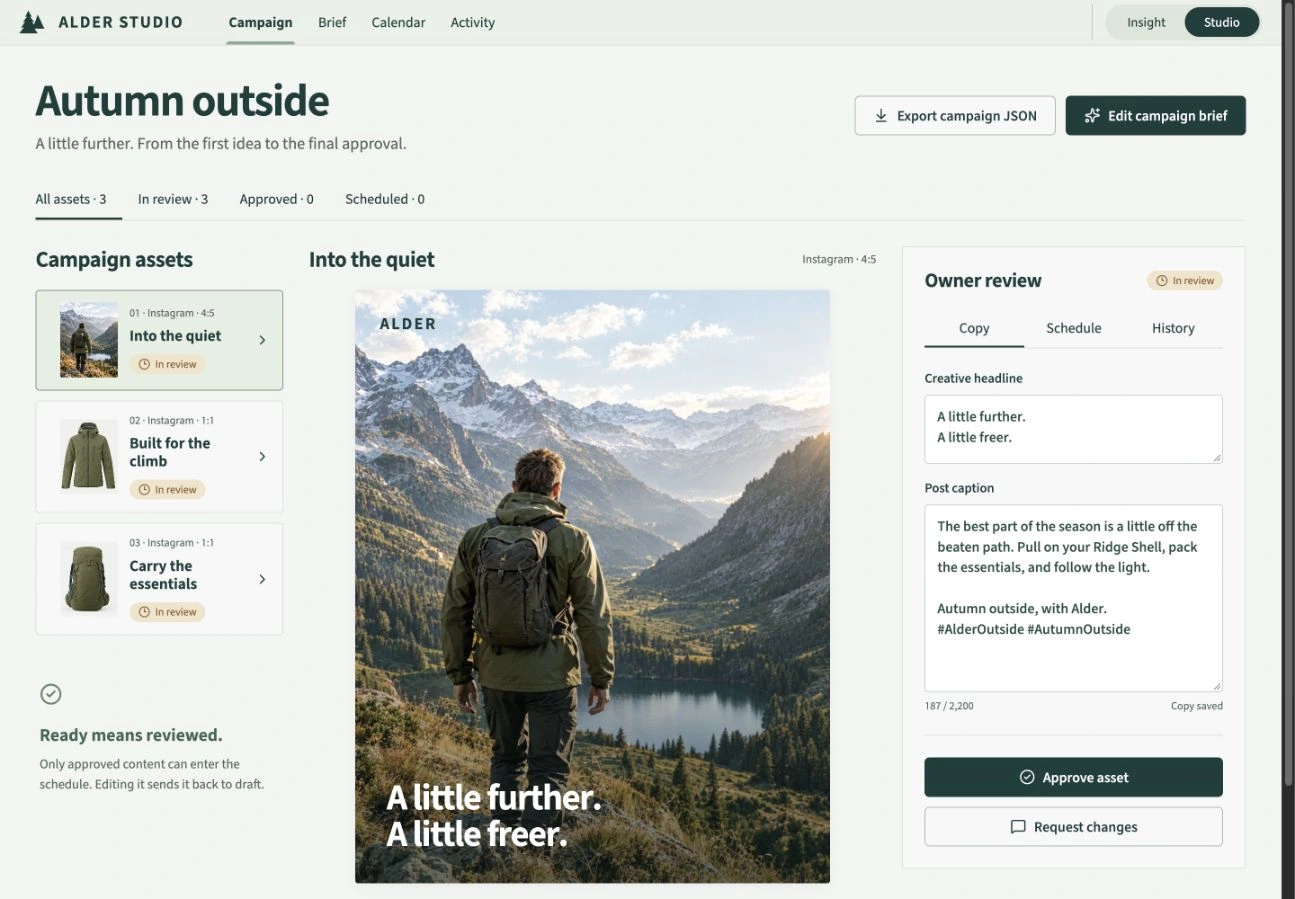
An edit sends content back to draft and clears its previous approval and schedule. Only approved content can be scheduled. Recent decisions remain visible in the activity history, so the state has a reason behind it.
Work from a focused brief, campaign imagery, and editable creative copy.
Edit headlines and captions, request changes, submit for review, and approve an asset.
Download a composed creative image, export campaign data, and add approved assets to a calendar.
Edit a caption and save it to see approval return to draft.
Submit it for review, approve it, then choose a publishing time.
Download the creative or export the content calendar.
Campaign drafts, feedback, approvals, and schedules are stored in your browser. Export creative files and calendar events to hand work to your team. Scheduling prepares a local plan; it does not publish to social accounts.

Tell us who you want to reach and what you want to change. We'll discuss the priorities, the work, and what it would cost.
Tell us about your businessA conversation about fit, not a commitment to a package.